Test environment and hardware
| Item | Tested configuration |
| Test date | 2026-10-02 |
| Operating system | Ubuntu 24.04.5 LTS, amd64 |
| Test hosts | 1 fresh isolated VM(s); resources below are per VM |
| CPU | 2 vCPU |
| Memory | 4 GiB |
| System disk | 32 GiB, HDD-backed, VirtIO, ext4 |
| Linux kernel | 6.8.0-139-generic |
| WordPress | 7.1.2 |
| PHP | 8.3.6 |
| Nginx | 1.24.0 |
| MariaDB | 10.11.14 |
Install WordPress natively with Nginx, PHP-FPM, and MariaDB under /opt. Separate core and upload permissions, then test login, real HTTP uploads, matched restoration, and services after reboot.
On this page
This tutorial was tested on fresh, isolated Ubuntu 24.04 virtual machines with synthetic data. Packages came from signature-verified sources for Noble. No production database or website credentials were used. Check the sources and versions appropriate for your own environment.
The screenshots show actual bash PTY output from the test machines, rendered in a browser terminal view. The prompt is normalized to lab$; results were not rewritten. This English edition preserves the tested commands and original images. Some code comments, sample strings, and screenshot footers remain in Traditional Chinese. Copyable commands are provided separately.
1. Understand the component layout
| Component | Configuration |
| WordPress core | /opt/wp-lab/site |
| Private configuration | /opt/wp-lab/wp-config.php, outside the webroot |
| PHP account | wp_lab, system account with nologin |
| PHP-FPM socket | /run/php/wp-lab.sock |
| Uploads | /opt/wp-lab/site/wp-content/uploads |
| Test entry point | http://blog.example.test:8080, loopback only |
| Database | MariaDB, local socket, dedicated database and role |
The test listener binds only loopback. Public HTTPS and domain setup are separate; see the Tunnel and Caddy guide. This local HTTP teaching endpoint is not a production public administration interface.
2. Install Ubuntu native packages
sudo apt update
sudo apt install nginx mariadb-server php8.3-fpm php8.3-mysql php8.3-cli \
  php8.3-curl php8.3-gd php8.3-mbstring php8.3-xml php8.3-zip php8.3-intl \
  curl unzip gnupg
sudo useradd --system --home /var/lib/wp-lab --shell /usr/sbin/nologin wp_lab
sudo install -d -m 0755 /opt/wp-lab /opt/wp-lab/site /opt/wp-lab/bin
sudo install -d -o root -g wp_lab -m 0750 /opt/wp-lab/private
sudo install -d -o wp_lab -g wp_lab -m 0750 /var/lib/wp-lab /var/lib/wp-lab/sessions
The test used reviewed, signed Noble packages without adding another Ubuntu release’s sources. WordPress and WP-CLI came from official sources, with core checksums and the WP-CLI GPG signature verified separately.
3. Download and verify official software
umask 077
mkdir -p ~/wp-download && cd ~/wp-download
curl -fsSL -o wp-cli.phar https://raw.githubusercontent.com/wp-cli/builds/gh-pages/phar/wp-cli.phar
curl -fsSL -o wp-cli.phar.asc https://raw.githubusercontent.com/wp-cli/builds/gh-pages/phar/wp-cli.phar.asc
curl -fsSL -o wp-cli.pgp https://raw.githubusercontent.com/wp-cli/builds/gh-pages/wp-cli.pgp
gpg --import wp-cli.pgp
gpg --verify wp-cli.phar.asc wp-cli.phar
sudo install -m 0755 wp-cli.phar /opt/wp-lab/bin/wp
curl -fsSL -o wordpress.tar.gz https://wordpress.org/wordpress-7.1.2.tar.gz
tar -tzf wordpress.tar.gz
sudo tar -xzf wordpress.tar.gz --strip-components=1 --no-same-owner -C /opt/wp-lab/site
sudo /opt/wp-lab/bin/wp --allow-root --path=/opt/wp-lab/site core verify-checksums --version=7.1.2 --locale=en_US
Verify the archive contains only expected wordpress/ paths before extracting into a fresh empty directory. System tar avoided long-path extraction issues. This fresh-install procedure must not overwrite an existing production site. Recheck current releases and verification at installation time; the tested version is a dated observation.
4. Generate private settings locally
This code is for a fresh teaching host. It generates database and administrator passwords locally, creates the MariaDB role through stdin, and stores settings outside the webroot. The administrator password remains root-only without being printed. Retrieve it through a secure local handoff; never place it in articles, captures, Git, or public pages.
sudo python3 - <<'PY'
import json, os, pathlib, secrets, subprocess
root=pathlib.Path('/opt/wp-lab')
assert not (root/'wp-config.php').exists()
dbpass=secrets.token_hex(32)
adminpass=secrets.token_urlsafe(36)
p=root/'private/admin-password'
fd=os.open(p,os.O_WRONLY|os.O_CREAT|os.O_EXCL,0o600)
with os.fdopen(fd,'w') as f: f.write(adminpass)
sql="CREATE DATABASE wp_lab CHARACTER SET utf8mb4 COLLATE utf8mb4_unicode_ci;"
sql+="CREATE USER 'wp_lab'@'localhost' IDENTIFIED BY '"+dbpass+"';"
sql+="GRANT ALL PRIVILEGES ON wp_lab.* TO 'wp_lab'@'localhost';"
subprocess.run(['mariadb','--batch'],input=sql.encode(),check=True)
cfg="<?php\n"
for name,value in {'DB_NAME':'wp_lab','DB_USER':'wp_lab','DB_PASSWORD':dbpass,
                   'DB_HOST':'localhost','DB_CHARSET':'utf8mb4','DB_COLLATE':''}.items():
    cfg+="define("+json.dumps(name)+","+json.dumps(value)+");\n"
for name in ['AUTH_KEY','SECURE_AUTH_KEY','LOGGED_IN_KEY','NONCE_KEY',
             'AUTH_SALT','SECURE_AUTH_SALT','LOGGED_IN_SALT','NONCE_SALT']:
    cfg+="define("+json.dumps(name)+","+json.dumps(secrets.token_hex(48))+ ");\n"
cfg+="$table_prefix='wp_'; define('DISALLOW_FILE_EDIT',true);"
cfg+="define('DISALLOW_FILE_MODS',true); define('WP_DEBUG',false);"
cfg+="define('WP_HOME','http://blog.example.test:8080');"
cfg+="define('WP_SITEURL','http://blog.example.test:8080');"
cfg+="define('ABSPATH',__DIR__.'/site/'); require_once ABSPATH.'wp-settings.php';"
config=root/'wp-config.php'; config.write_text(cfg); config.chmod(0o640)
subprocess.run(['chown','root:wp_lab',str(config)],check=True)
print('Private configuration created; secret values are not displayed.')
PY
Resolve blog.example.test to 127.0.0.1 on the test host. Preserve this mapping when Cloud-Init manages hosts. Resolution remained correct after the retested reboot. Use managed DNS and HTTPS names for production.
5. Initialize WordPress and file permissions
sudo tee /opt/wp-lab/private/initialize.php >/dev/null <<'PHP'
<?php
define('WP_INSTALLING',true);
require '/opt/wp-lab/wp-config.php';
require_once ABSPATH.'wp-admin/includes/upgrade.php';
wp_install('Native WordPress Lab','lab_admin','admin'.'@'.'example.invalid',false,'',
    file_get_contents('/opt/wp-lab/private/admin-password'));
update_option('users_can_register',0);
update_option('default_comment_status','closed');
update_option('default_ping_status','closed');
update_option('blog_public',0);
update_option('permalink_structure','/%postname%/');
PHP
sudo chmod 0600 /opt/wp-lab/private/initialize.php
sudo php /opt/wp-lab/private/initialize.php
sudo chown -R root:root /opt/wp-lab/site
sudo install -d -o wp_lab -g wp_lab -m 0755 /opt/wp-lab/site/wp-content/uploads
sudo chown -R wp_lab:wp_lab /opt/wp-lab/site/wp-content/uploads
The sample address [email protected] cannot receive recovery mail. Production needs an address you control and verified delivery. SMTP, registration, payments, and memberships were not configured. Administrators manage core updates; DISALLOW_FILE_MODS disables browser-based code updates and plugin installation, so provide a separate update workflow.
6. Configure a dedicated PHP-FPM pool
; /etc/php/8.3/fpm/pool.d/wp-lab.conf
[wp-lab]
user = wp_lab
group = wp_lab
listen = /run/php/wp-lab.sock
listen.owner = www-data
listen.group = www-data
listen.mode = 0660
pm = ondemand
pm.max_children = 3
pm.process_idle_timeout = 10s
php_admin_value[session.save_path] = /var/lib/wp-lab/sessions
php_admin_flag[display_errors] = off
php_admin_flag[log_errors] = on
7. Configure Nginx and permalinks
# /etc/nginx/conf.d/wp-lab.conf
server {
    listen 127.0.0.1:8080;
    server_name blog.example.test;
    root /opt/wp-lab/site;
    index index.php;
    client_max_body_size 4m;
    location ~* ^/wp-content/uploads/.*\.php$ { return 403; }
    location ~ /\. { deny all; }
    location = /wp-config.php { deny all; }
    location / { try_files $uri $uri/ /index.php?$args; }
    location ~ \.php$ {
        include snippets/fastcgi-php.conf;
        fastcgi_pass unix:/run/php/wp-lab.sock;
    }
}
sudo php-fpm8.3 -t
sudo nginx -t
sudo systemctl enable --now nginx php8.3-fpm mariadb
sudo systemctl restart php8.3-fpm nginx
systemctl is-active nginx php8.3-fpm mariadb
curl -s -o /dev/null -w 'HTTP %{http_code}\n' http://blog.example.test:8080/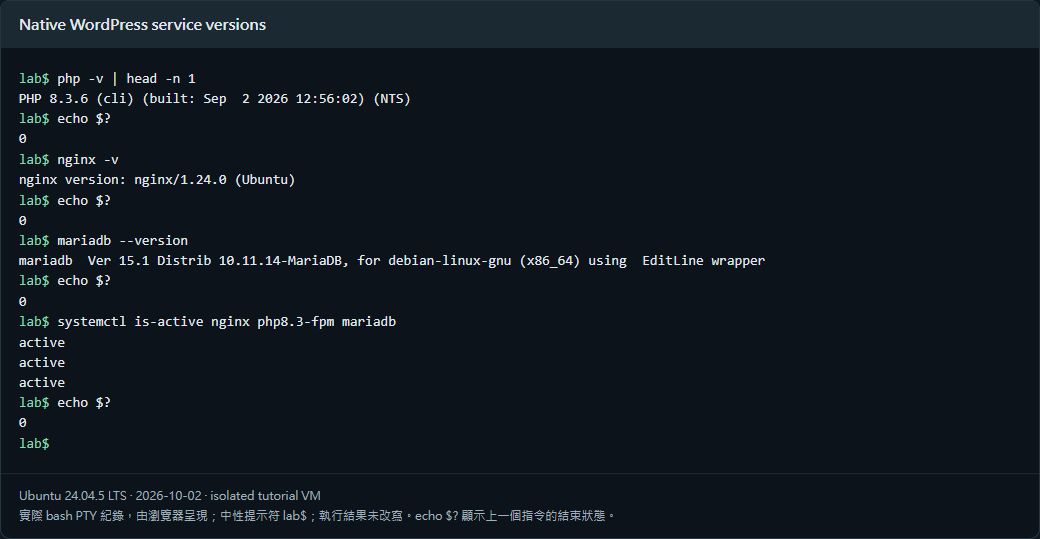
The unused Nginx default site was disabled on this fresh host to avoid another listener; do not blindly do that on a shared webserver. Tests covered login, sample publishing, permalinks, a real PHP-handled HTTP media upload returning 201, and byte-identical anonymous image downloads.
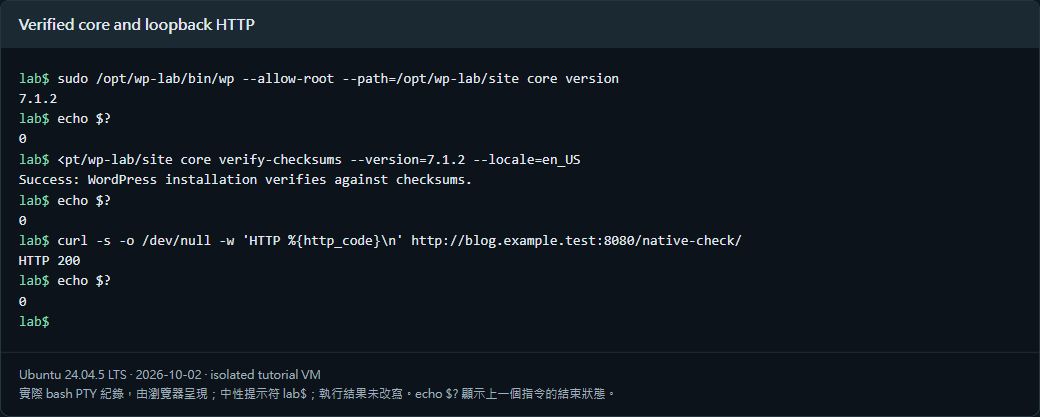
8. Confirm the core is protected and uploads work
sudo -u wp_lab test -w /opt/wp-lab/site/wp-includes/version.php
echo $?
sudo -u wp_lab test -w /opt/wp-lab/site/wp-content/uploads
echo $?
Expect nonzero for the first test and zero for the second. Beyond permissions, an authenticated REST upload verified that PHP owned the saved file and anonymous users could download it. A test PHP file in uploads returned Nginx 403; the anonymous users API returned 401.
9. Keep SQL and files in one matched backup set
The test stopped PHP-FPM to pause website writes, saved a database dump and a file archive containing core, uploads, and private settings, then restored PHP immediately. Schedule maintenance and encrypt independent production copies. Backups contain password hashes, database credentials, and salts; never upload them publicly.
sudo install -d -m 0700 /var/backups/wp-lab
sudo systemctl stop php8.3-fpm
sudo sh -c 'umask 077; mariadb-dump --single-transaction --routines --triggers wp_lab > /var/backups/wp-lab/site.sql'
sudo tar -czf /var/backups/wp-lab/site.tar.gz -C /opt/wp-lab site wp-config.php
sudo chmod 0600 /var/backups/wp-lab/site.tar.gz
sudo systemctl start php8.3-fpm
SQL was restored to a new separate database; files were extracted to another private directory. Sample posts, upload records, and image bytes matched. After a real reboot, services, name resolution, articles, and login passed. Restoration did not overwrite the source site and did not test a complete switch to another host.
Verified results
| Verification | Result |
| WP-CLI GPG signature and core checksums passed | Passed |
| Nginx/PHP-FPM/MariaDB healthy | Passed |
| HTTP login and permalinks worked | Passed |
| Real HTTP upload returned 201; PHP owned file | Passed |
| Anonymous users API 401; uploaded PHP 403 | Passed |
| Matched SQL and image restore verified | Passed |
| Services, hostname, and login healthy after reboot | Passed |
Scope: native services, private loopback HTTP, core checksums, real login and upload, permissions, matched SQL/image restoration, and reboot. Production HTTPS, SMTP, paid plugins, membership billing, cross-host cutover, and traffic capacity were not tested.
Official references
developer.wordpress.org/advanced-administration/before-install/howto-install · developer.wordpress.org/advanced-administration/security/hardening · make.wordpress.org/cli/handbook/guides/installing