Test environment and hardware
| Item | Tested configuration |
| Test date | 2026-10-02 |
| Operating system | Ubuntu 24.04.5 LTS, amd64 |
| Test hosts | 1 fresh isolated VM(s); resources below are per VM |
| CPU | 2 vCPU |
| Memory | 4 GiB |
| System disk | 32 GiB, HDD-backed, VirtIO, ext4 |
| Linux kernel | 6.8.0-139-generic |
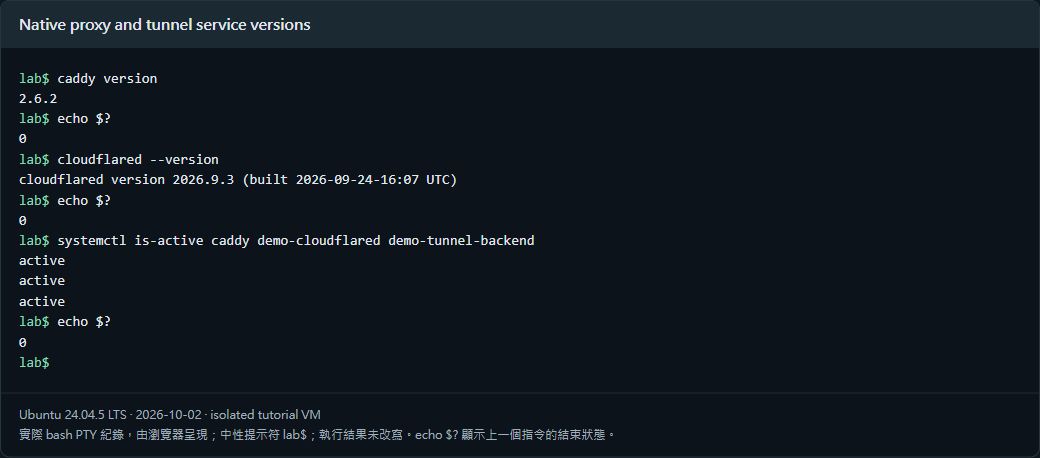
| Caddy | 2.6.2 |
| cloudflared | 2026.9.3 |
Use a temporary Cloudflare Tunnel to reach local Caddy and a loopback test page. Verify public HTTPS, the real client IP, and forged-header rejection, then close the entry point.
On this page
This tutorial was tested on fresh, isolated Ubuntu 24.04 virtual machines with synthetic data. Packages came from signature-verified sources for Noble. No production database or website credentials were used. Check the sources and versions appropriate for your own environment.
The screenshots show actual bash PTY output from the test machines, rendered in a browser terminal view. The prompt is normalized to lab$; results were not rewritten. This English edition preserves the tested commands and original images. Some code comments, sample strings, and screenshot footers remain in Traditional Chinese. Copyable commands are provided separately.
1. Test architecture
外部瀏覽器
  → Cloudflare HTTPS 邊緣
  → cloudflared 建立的暫時 Tunnel
  → Caddy 127.0.0.1:8080
  → Python 範例網站 127.0.0.1:8081
The path is: external browser → Cloudflare HTTPS edge → cloudflared Quick Tunnel → Caddy on 127.0.0.1:8080 → Python demo on 127.0.0.1:8081. All three processes run on one fresh isolated VM. Loopback listeners prevent other LAN hosts from directly injecting origin headers. The page exposes only a generic connection-success message, with no administration, file browsing, or IP lookup. The test entry point was closed afterward.
Quick Tunnel needs no account or custom domain setup. It is for testing, has concurrency and SSE limitations, and offers no production availability commitment. Use a named tunnel and a domain you control for production.
2. Install trusted native packages
sudo apt update
sudo apt install caddy python3 curl ca-certificates gnupg

# 一般 Ubuntu 24.04 使用官方 Cloudflare Noble 來源的寫法
sudo install -d -m 0755 /usr/share/keyrings
curl -fsSL https://pkg.cloudflare.com/cloudflare-main.gpg \
  | sudo gpg --dearmor --yes -o /usr/share/keyrings/cloudflare-main.gpg
echo 'deb [signed-by=/usr/share/keyrings/cloudflare-main.gpg] https://pkg.cloudflare.com/cloudflared noble main' \
  | sudo tee /etc/apt/sources.list.d/cloudflared.list >/dev/null
sudo apt update
sudo apt install cloudflared
caddy version
cloudflared --version
In the controlled test, the mirror verified Cloudflare’s current signature and the complete Packages-to-deb SHA-256 chain, then published a locally signed package. The command shows the ordinary official source. Follow an existing approved mirror policy rather than bypassing it. No production Tunnel token was downloaded or used.
3. Build a minimal loopback-only backend
The example handles requests like the tested backend. Source fields go into a private file and are never returned publicly. A dedicated non-login account owns the directory; logs use mode 0600.
sudo useradd --system --home /var/lib/demo-tunnel --shell /usr/sbin/nologin demo_tunnel
sudo install -d -o demo_tunnel -g demo_tunnel -m 0700 /var/lib/demo-tunnel
sudo tee /usr/local/lib/demo-tunnel-backend.py >/dev/null <<'PY'
from http.server import BaseHTTPRequestHandler, HTTPServer
import ipaddress, json, os, pathlib
class Handler(BaseHTTPRequestHandler):
    def log_message(self,*args):
        pass
    def do_GET(self):
        client=self.headers.get('CF-Connecting-IP','')
        try:
            ipaddress.ip_address(client)
        except ValueError:
            self.send_error(403)
            return
        event={'path':self.path,'client':client,
               'forwarded':self.headers.get('X-Forwarded-For',''),
               'transport':self.client_address[0]}
        log=pathlib.Path('/var/lib/demo-tunnel/events.jsonl')
        with log.open('a') as f:
            f.write(json.dumps(event)+'\n')
        os.chmod(log,0o600)
        body='<h1>連線成功</h1><p>Temporary isolated tutorial service</p>'.encode()
        self.send_response(200)
        self.send_header('Content-Type','text/html; charset=utf-8')
        self.send_header('Content-Length',str(len(body)))
        self.end_headers()
        self.wfile.write(body)
HTTPServer(('127.0.0.1',8081),Handler).serve_forever()
PY
# /etc/systemd/system/demo-tunnel-backend.service
[Unit]
After=network.target
[Service]
User=demo_tunnel
Group=demo_tunnel
ExecStart=/usr/bin/python3 /usr/local/lib/demo-tunnel-backend.py
NoNewPrivileges=true
ProtectHome=true
ProtectSystem=strict
ReadWritePaths=/var/lib/demo-tunnel
[Install]
WantedBy=multi-user.target4. Configure Caddy: binding and Host matching differ
# /etc/caddy/Caddyfile
:8080 {
    bind 127.0.0.1
    @edge header CF-Connecting-IP *
    handle @edge {
        reverse_proxy 127.0.0.1:8081 {
            header_up X-Forwarded-For {http.request.header.CF-Connecting-IP}
        }
    }
    handle {
        respond "Missing trusted edge header" 403
    }
}
A site address of http://127.0.0.1:8080 also creates a Host matcher for 127.0.0.1. A Quick Tunnel supplies its public temporary hostname, potentially missing the route and returning an empty response. Use :8080 for that listener’s Host values and bind 127.0.0.1 for network restriction. This does not open a LAN listener.
sudo caddy validate --config /etc/caddy/Caddyfile
sudo systemctl daemon-reload
sudo systemctl enable --now demo-tunnel-backend caddy
sudo systemctl restart caddy
curl -s -o /dev/null -w 'HTTP %{http_code}\n' http://127.0.0.1:8080/
A direct Caddy call without the expected edge header should return 403. This model trusts local cloudflared and administrators; it is unsuitable for untrusted local processes sharing the listener. Cross-host proxies require separate source restrictions and trusted-proxy configuration. Do not trust arbitrary incoming CF-Connecting-IP values.
5. Start the temporary tunnel and connect over HTTPS
cloudflared --no-autoupdate tunnel --url http://127.0.0.1:8080cloudflared prints a generated HTTPS entry point. An external browser should see the Chinese text meaning “Connection successful.” The actual test URL is not published. Stop the process after testing so it no longer serves this origin. The test managed the same process with systemd; stop an interactive instance before using the following unit.
# /etc/systemd/system/demo-cloudflared.service
[Unit]
After=network-online.target caddy.service demo-tunnel-backend.service
Wants=network-online.target
[Service]
ExecStart=/usr/local/bin/cloudflared --no-autoupdate tunnel --url http://127.0.0.1:8080
Restart=no
StandardOutput=append:/var/log/demo-tunnel/cloudflared.log
StandardError=append:/var/log/demo-tunnel/cloudflared.log
[Install]
WantedBy=multi-user.target
command -v cloudflared
sudo install -d -m 0700 /var/log/demo-tunnel
sudo install -m 0600 /dev/null /var/log/demo-tunnel/cloudflared.log
sudo systemctl daemon-reload
sudo systemctl start demo-cloudflared
systemctl is-active caddy demo-cloudflared demo-tunnel-backendThe tested official deb installed cloudflared at /usr/local/bin/cloudflared. Check command -v before setting ExecStart. This short-lived teaching unit has no automatic restart and is not enabled as a public boot-time entry point. Its private log uses mode 0600.
6. Verify the real client IP privately
The backend transport peer is 127.0.0.1, not the visitor. Obtain the client address from CF-Connecting-IP on the trusted tunnel path. The test first observed its own IPv4 egress, then made public HTTPS requests and compared the following conditions in private logs:
| Condition | Observed result |
| CF-Connecting-IP matches caller egress | Passed |
| X-Forwarded-For matches the same client | Passed |
| Backend transport peer is loopback | Passed |
| Forged X-Forwarded-For alone | Overridden with actual client IP |
| Forged reserved CF-Connecting-IP | 403; no request reached backend |
| Direct Caddy call without edge header | 403 |
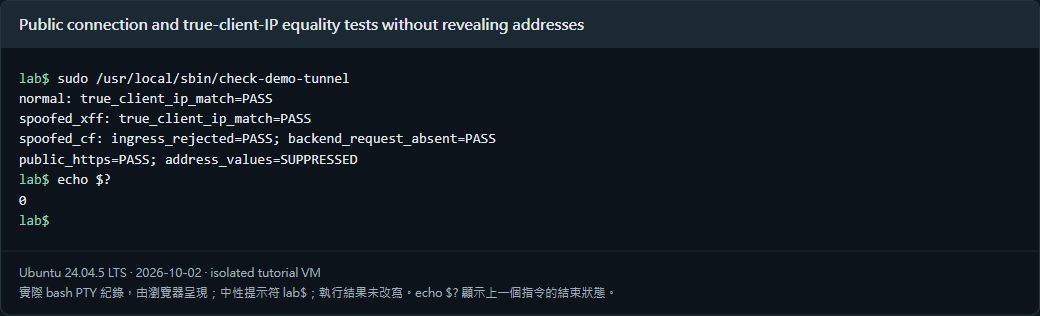
The capture shows only comparison results, not real IPs, entry URLs, or raw logs. The checker made three sets of public requests, including forged XFF and a forged reserved CF header. PASS required an actual client-IP comparison or 403 with no backend request; results were not manually filled in.
7. Use a custom production domain
A domain managed in Cloudflare can be used, but a Quick Tunnel hostname cannot simply be renamed. Create a named tunnel, configure its public hostname and DNS route, and store connector credentials with minimum privileges. This test created no production domain, published no UUID or token, and changed no existing production tunnel.
8. Close the temporary entry point
sudo systemctl stop demo-cloudflared demo-tunnel-backend caddy
systemctl is-active demo-cloudflared
Use Ctrl+C for an interactive cloudflared process, or the commands above for these test services. The processes stopped, and a new path on the former entry point no longer returned the original connection-success page. Keep private test records on the isolated host, outside the WordPress media library.
Verified results
| Verification | Result |
| Public HTTPS returned the test page | Passed |
| Caddy and backend bound only loopback | Passed |
| Client IP matched observed caller egress | Passed |
| Forged public forwarding headers not trusted | Passed |
| Direct call without trusted header returned 403 | Passed |
| Closed entry point stopped serving the original page | Passed |
Scope: Quick Tunnel, same-host loopback Caddy/backend, actual client-IP equality, forged headers, and closure. New named tunnels, custom-domain provisioning, cross-host proxy trust, production capacity, and availability were not validated by this exercise.
Official references
developers.cloudflare.com/tunnel/get-started/quick-tunnels · pkg.cloudflare.com/index.html · caddyserver.com/docs/caddyfile/directives/reverse_proxy