Test environment and hardware
| Item | Tested configuration |
| Test date | 2026-10-02 |
| Operating system | Ubuntu 24.04.5 LTS, amd64 |
| Test hosts | 2 fresh isolated VM(s); resources below are per VM |
| CPU | 2 vCPU |
| Memory | 4 GiB |
| System disk | 32 GiB, HDD-backed, VirtIO, ext4 |
| Linux kernel | 6.8.0-139-generic |
| PostgreSQL | 16.15, native Ubuntu packages |
Move a PostgreSQL 16 sample database between two separate Ubuntu 24.04 hosts, checking archive hashes, data, owners, indexes, and the result after reboot.
On this page
This tutorial was tested on fresh, isolated Ubuntu 24.04 virtual machines with synthetic data. Packages came from signature-verified sources for Noble. No production database or website credentials were used. Check the sources and versions appropriate for your own environment.
The screenshots show actual bash PTY output from the test machines, rendered in a browser terminal view. The prompt is normalized to lab$; results were not rewritten. This English edition preserves the tested commands and original images. Some code comments, sample strings, and screenshot footers remain in Traditional Chinese. Copyable commands are provided separately.
First complete the native PostgreSQL installation. This series uses the demo database; where a sample table is required, follow the migration tutorial to create 100 synthetic rows. Work in an isolated learning environment.
1. Define the migration scope
Both test servers run PostgreSQL 16.15. The demo database belongs to app_user and contains a sample table with 100 rows and a primary key. This is a same-major-version logical migration; production cutover, downtime, and major upgrades need separate planning.
pg_dump backs up one database; roles belong to the cluster and need a separate inventory. Before production migration, pause writes or arrange a final consistent backup, and record roles, extensions, locale, encoding, and application connections.
2. Create recognizable sample data on the source
sudo -u postgres psql -X -v ON_ERROR_STOP=1 <<'SQL'
CREATE ROLE app_user LOGIN;
CREATE DATABASE demo OWNER app_user;
SQL
sudo -u postgres psql -X -v ON_ERROR_STOP=1 -d demo <<'SQL'
SET ROLE app_user;
CREATE TABLE sample(id integer PRIMARY KEY, note text NOT NULL);
INSERT INTO sample SELECT n, 'sample-' || n FROM generate_series(1,100) n;
SELECT count(*) AS rows, sum(id) AS id_sum FROM sample;
SQL
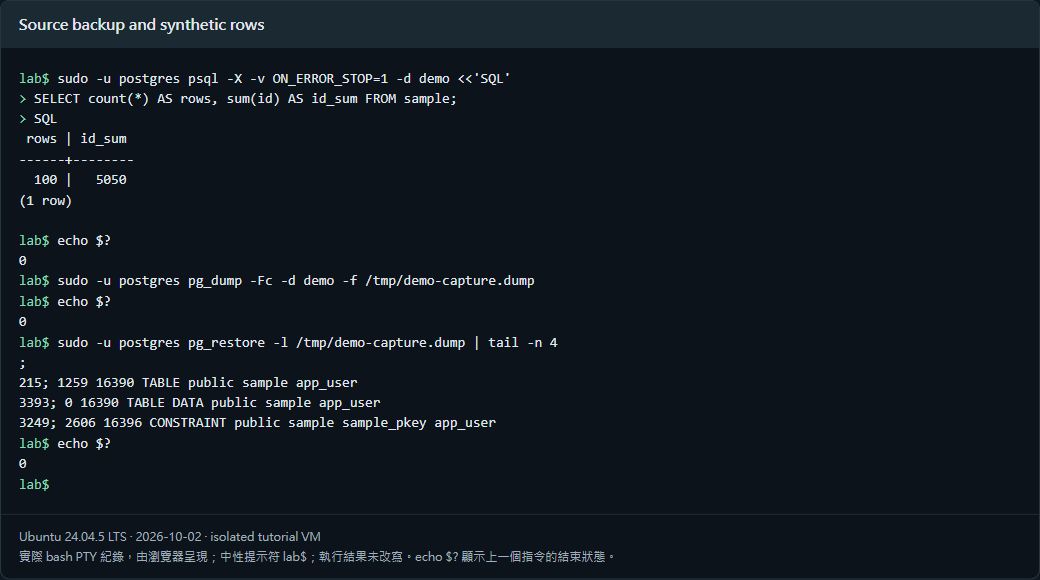
Expect 100 rows and an ID sum of 5050. This setup belongs on an empty learning system. Do not overwrite existing roles or databases.
3. Create a custom archive and checksum
sudo install -d -o postgres -g postgres -m 0700 /var/backups/postgresql/demo
sudo -u postgres pg_dump -Fc -d demo -f /var/backups/postgresql/demo/demo.dump
sudo -u postgres sh -c 'cd /var/backups/postgresql/demo && sha256sum demo.dump > demo.dump.sha256'
sudo -u postgres sh -c 'umask 077; pg_dumpall --globals-only --no-role-passwords > /var/backups/postgresql/demo/globals.sql'
sudo -u postgres pg_restore -l /var/backups/postgresql/demo/demo.dump
--no-role-passwords deliberately excludes password verifiers from the role export. globals.sql can still reveal internal names, privileges, and paths. Keep the export private and out of website directories.
4. Transfer over a protected channel
The test used encrypted SSH with pinned host fingerprints through a controller to a fresh destination VM. Source and destination SHA-256 matched. Use verified SSH/SCP, restrict file access, and keep host-key verification enabled. Never publish database archives.
The next command assumes demo.dump and demo.dump.sha256 are already at the destination’s /var/backups/postgresql/demo, owned by postgres.
sudo -u postgres sh -c 'cd /var/backups/postgresql/demo && sha256sum --check demo.dump.sha256'
sudo -u postgres pg_restore -l /var/backups/postgresql/demo/demo.dump
5. Create required roles, then restore
This exercise needs only an ordinary app_user role, so create it on the destination. Review globals and select necessary roles; blindly importing everything can conflict with existing postgres or administrator roles.
sudo -u postgres psql -X -v ON_ERROR_STOP=1 <<'SQL'
CREATE ROLE app_user LOGIN;
CREATE DATABASE demo OWNER app_user;
SQL
sudo -u postgres pg_restore --exit-on-error --single-transaction \
  -d demo /var/backups/postgresql/demo/demo.dump
sudo -u postgres psql -X -d demo -c 'ANALYZE;'
Restore as postgres to retain original object ownership; this example does not use –no-owner. Role exports omit passwords. Before TCP application login, use \password app_user interactively on the destination and test its HBA and TLS rules.
6. Verify contents, ownership, and indexes
sudo -u postgres psql -X -d demo <<'SQL'
SELECT count(*), sum(id), bool_and(note = 'sample-' || id) FROM sample;
SELECT tableowner FROM pg_tables WHERE schemaname='public' AND tablename='sample';
SELECT indexname FROM pg_indexes WHERE schemaname='public' AND tablename='sample';
SQL
pg_isready -h 127.0.0.1 -p 5432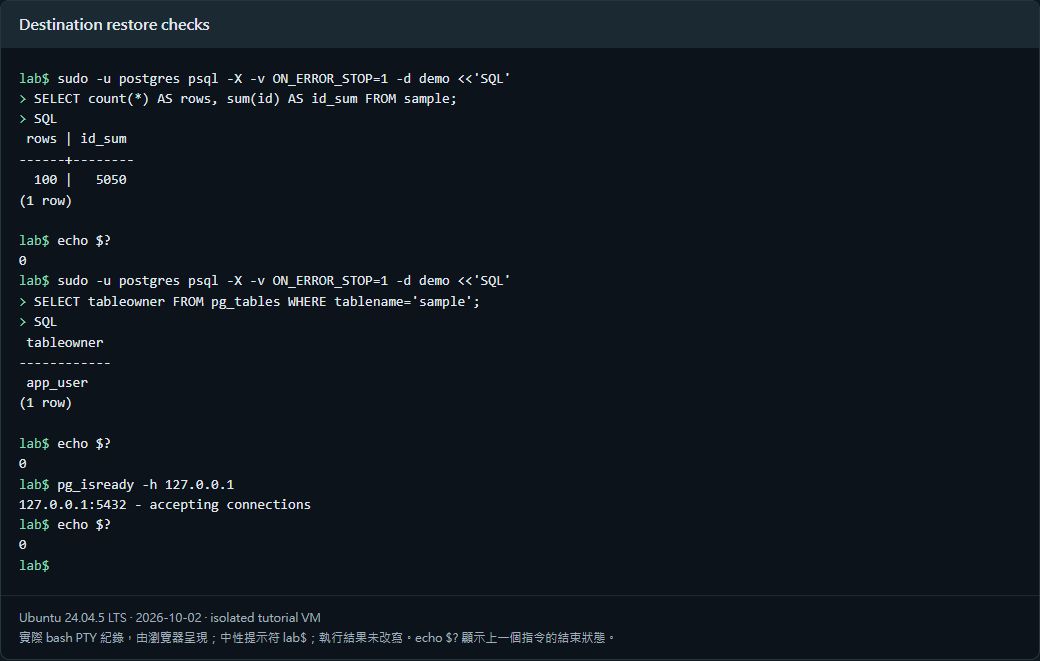
The restored check returned 100 | 5050 | t, with app_user ownership and the primary-key index intact. After rebooting the new server, connectivity and all 100 rows were checked again.
Verified results
| Verification | Result |
| Matching archive SHA-256 between two VMs | Passed |
| 100 rows, sum, and content rules match | Passed |
| Ownership and primary-key index retained | Passed |
| ANALYZE completed | Passed |
| Service and data healthy after reboot | Passed |
Scope: same-version PostgreSQL, synthetic data, and migration between two VMs. No production application cutover, major-version upgrade, extension compatibility study, or large-database downtime measurement is claimed.
Official references
www.postgresql.org/docs/16/backup-dump.html · www.postgresql.org/docs/16/app-pgrestore.html