Test environment and hardware
| Item | Tested configuration |
| Test date | 2026-10-02 |
| Operating system | Ubuntu 24.04.5 LTS, amd64 |
| Test hosts | 1 fresh isolated VM(s); resources below are per VM |
| CPU | 2 vCPU (x86-64-v2-AES) |
| Memory | 4 GiB |
| System disk | 32 GiB, HDD-backed, VirtIO, ext4 |
| Virtualization | Proxmox VE 9.2.18 |
| PostgreSQL | 16.15, native Ubuntu packages |
This was executed on a newly created Ubuntu test VM. The resources describe the test, not minimum requirements. Small sample data verifies functionality rather than production performance.
On this page
Verified: the backup script, SHA-256 checksums, mutual exclusion, retention preview, isolated restoration, and reboot persistence. A corrupt archive was rejected. An accelerated timer actually ran the backup before the daily schedule was restored; no overnight trigger was observed. Off-site transfer, PITR, and large workloads were not tested.
After the installation guide, turn backups into a repeatable, traceable workflow. This uses the same appdb database and app_user role, native tools, and systemd, without Docker.
The example assumes local PostgreSQL 16, Unix sockets in /var/run/postgresql, port 5432, and peer access for the Linux postgres account. Check pg_lsclusters if your version, cluster, or port differs. Paths are tutorial examples.
The terminal captures show actual PTY output with a normalized lab$ prompt. Execution results were not rewritten. Tested commands and images are unchanged in this English edition; some comments, sample strings, and screenshot footers remain in Traditional Chinese.
1. Decide what recovery must achieve
Define acceptable data loss and service recovery time. Even successful daily backups can lose almost a day of changes; unnoticed failures widen the gap. Measure restoration time with a real exercise.
A custom-format pg_dump saves one database’s schema and data consistently while normal reads and writes continue. Large databases still consume CPU and I/O; avoid peak periods and conflicting schema changes. It does not back up the whole host, application uploads, or all server settings.
2. Prepare a private backup directory
Use a regular sudo-capable account. If the directory already exists, inspect its purpose and contents first. This example lets postgres write backups while excluding ordinary users.
pg_lsclusters
sudo install -d -o postgres -g postgres -m 0700 /var/backups/postgresql/appdb
sudo -u postgres /usr/lib/postgresql/16/bin/psql \
  -h /var/run/postgresql -p 5432 -d appdb \
  -c "SELECT current_database(), current_user;"
df -h /var/backups/postgresql/appdb
Check connectivity, the database name, and free disk space. Local peer authentication keeps passwords out of the script. Remote backups need separate TLS, role, and credential handling.
3. Create a repeatable backup script
Use sudoedit /usr/local/sbin/backup-appdb to create the script below. Preserve and inspect any existing file first. It writes a temporary archive and renames it only after checks succeed, preventing incomplete files from appearing finished.
#!/bin/bash
set -euo pipefail
umask 077

backup_dir=/var/backups/postgresql/appdb
pg_bin=/usr/lib/postgresql/16/bin
cd "$backup_dir"

exec 9>.backup.lock
flock -n 9 || { echo "Another backup is running" >&2; exit 1; }

stamp=$(date -u +%Y%m%dT%H%M%SZ)
name="appdb-${stamp}.dump"
temp_file=$(mktemp .appdb-XXXXXX.partial)
trap 'rm -f -- "$temp_file"' EXIT

"$pg_bin/pg_dump" -h /var/run/postgresql -p 5432 \
  -U postgres -d appdb -Fc -f "$temp_file"
test -s "$temp_file"
"$pg_bin/pg_restore" --list "$temp_file" > /dev/null

mv -n -- "$temp_file" "$name"
test ! -e "$temp_file"
sha256sum "$name" > "$name.sha256"
sha256sum --check "$name.sha256"
printf 'Backup completed: %s\n' "$name"
set -euo pipefail stops on errors; flock prevents concurrent runs; umask 077 restricts new files. Names use UTC. SHA-256 checks transfer integrity, while pg_restore –list checks archive readability. Neither proves the database can be restored.
sudo chown root:postgres /usr/local/sbin/backup-appdb
sudo chmod 0750 /usr/local/sbin/backup-appdb
sudo bash -n /usr/local/sbin/backup-appdb
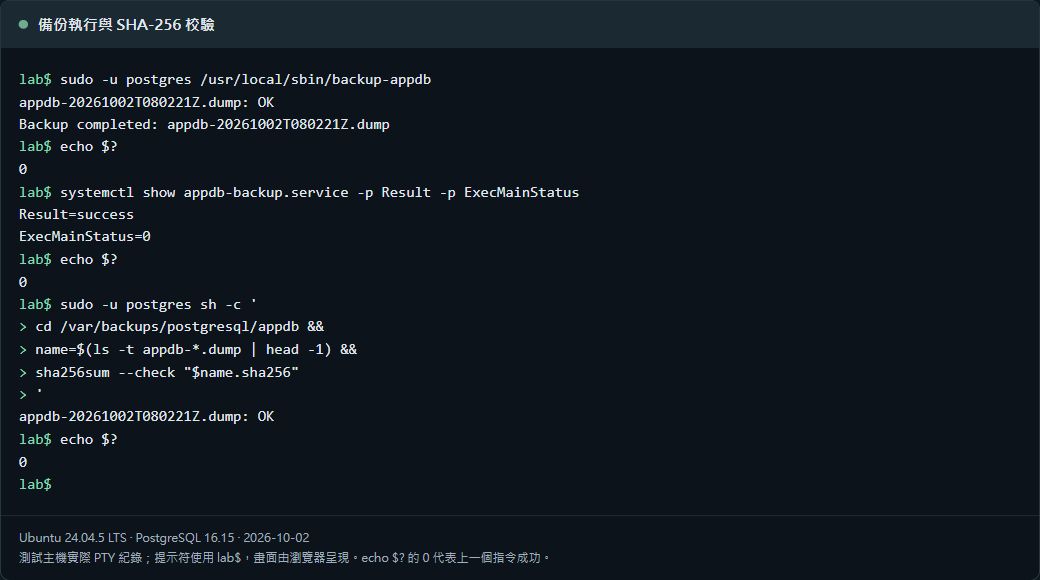
sudo -u postgres /usr/local/sbin/backup-appdb
sudo -u postgres ls -lh /var/backups/postgresql/appdb
Run manually before scheduling. The restricted files remain unencrypted, and postgres can modify this directory. Treat it as a local starting point and retain a separately protected copy.
4. Schedule a daily systemd run
Create /etc/systemd/system/appdb-backup.service with sudoedit. The service runs as postgres, but root manages the script; do not make postgres its owner.
[Unit]
Description=Logical backup of appdb
After=postgresql@16-main.service
Requires=postgresql@16-main.service

[Service]
Type=oneshot
User=postgres
Group=postgres
UMask=0077
ExecStart=/usr/local/sbin/backup-appdb
TimeoutStartSec=2h
Create /etc/systemd/system/appdb-backup.timer. This schedule uses 03:15 Asia/Taipei with up to five minutes of random delay. Adjust the two-hour service timeout to the actual database size.
[Unit]
Description=Daily appdb backup

[Timer]
OnCalendar=*-*-* 03:15:00 Asia/Taipei
RandomizedDelaySec=5m
Persistent=true
Unit=appdb-backup.service

[Install]
WantedBy=timers.target
Persistent=true can catch up one missed calendar activation when the timer resumes. It cannot reconstruct each missed day’s data or provide external failure notifications.
sudo systemd-analyze verify /etc/systemd/system/appdb-backup.service \
  /etc/systemd/system/appdb-backup.timer
systemd-analyze calendar '*-*-* 03:15:00 Asia/Taipei'
sudo systemctl daemon-reload
sudo systemctl start appdb-backup.service
sudo systemctl enable --now appdb-backup.timer
systemctl list-timers appdb-backup.timer --all
5. Verify completion, not just timer enablement
systemctl show appdb-backup.service -p Result -p ExecMainStatus
sudo journalctl -u appdb-backup.service -n 50 --no-pager
sudo -u postgres ls -lh /var/backups/postgresql/appdb
df -h /var/backups/postgresql/appdb
A completed successful run has Result=success, ExecMainStatus=0, a completion log, and matching .dump and .sha256 files. A finished oneshot service can be inactive. While a run is still executing, status fields may not describe its completed result.
Monitor the last successful backup time, free space, and service failures, and configure a notification channel you actually receive. This example neither configures alerts nor automatically removes old backups.
6. Restore into a separate database
Select a real archive and replace the sample filename. Confirm appdb_restore_check does not exist. Keep appdb intact. This exercise assumes the simple app_user-owned database from the installation guide and reuses its roles and extension environment.
backup_dir=/var/backups/postgresql/appdb
name=appdb-20261002T031500Z.dump
backup_file="$backup_dir/$name"

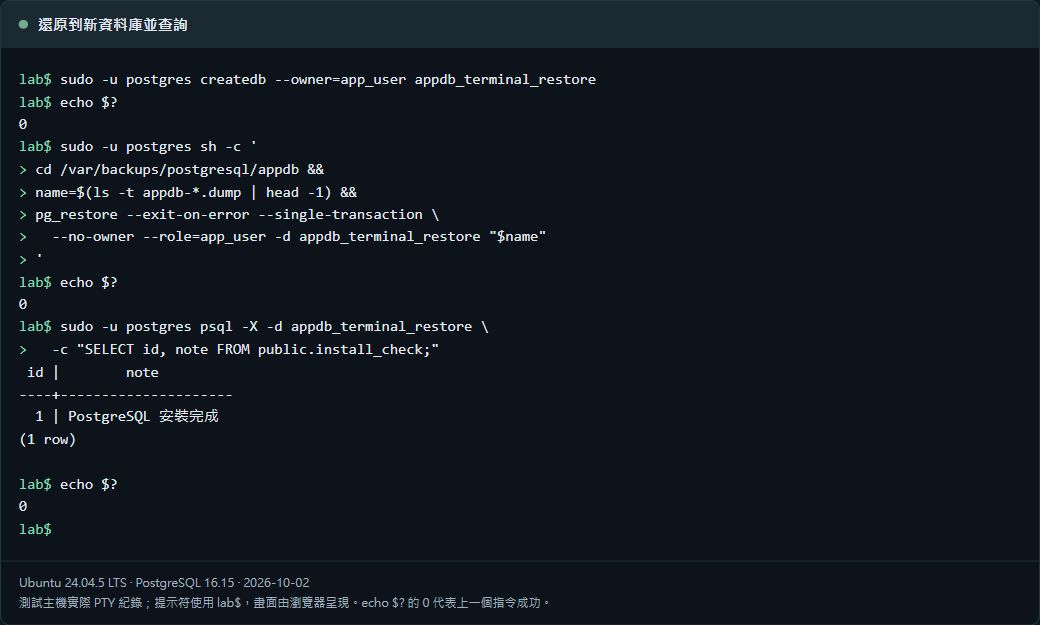
sudo -u postgres bash -c 'cd "$1" && sha256sum --check "$2.sha256"' \
  bash "$backup_dir" "$name"

sudo -u postgres /usr/lib/postgresql/16/bin/createdb \
  -h /var/run/postgresql -p 5432 --owner=app_user appdb_restore_check

sudo -u postgres /usr/lib/postgresql/16/bin/pg_restore \
  -h /var/run/postgresql -p 5432 \
  --exit-on-error --single-transaction \
  --no-owner --role=app_user \
  --dbname=appdb_restore_check "$backup_file"

sudo -u postgres /usr/lib/postgresql/16/bin/psql \
  -h /var/run/postgresql -p 5432 -d appdb_restore_check \
  -c "SELECT id, note FROM public.install_check;"
--single-transaction avoids partially restored objects on failure, although the newly created database remains. --no-owner --role=app_user creates this example’s objects as app_user; it does not reproduce a complex multi-owner configuration.
Expect the install_check sample row. Point a test application at the restored database and verify important queries, row counts, indexes, and behavior. Compare changing production data according to backup time and business rules. Record the archive, elapsed restoration time, and checks.
7. Retain multiple generations and independent copies
One starting policy is 14 daily copies plus eight weekly copies, adjusted to data size and recovery needs. Classify weekly copies separately so daily cleanup cannot remove them. A single newest backup may miss damage discovered days later.
The command below only lists daily dumps at least fourteen full days old. It deletes nothing. Before cleanup, verify newer backups and independent copies, and manage each dump with its checksum. Investigate capacity or repeated failures before removing the only recoverable archive.
sudo -u postgres sh -c '
  cd /var/backups/postgresql/appdb &&
  find . -maxdepth 1 -type f -name "appdb-*.dump" -mtime +13 -print
'
Change into a directory accessible to postgres before running find. Starting from another account’s private home can cause a “Failed to restore initial working directory” error. The shown form was tested from a private-home environment.
A copy on the same host and disk can disappear with the original. Use another device, offline disk, or off-site storage as appropriate. Encrypt transfers and use restricted, versioned, or immutable retention. Automated transfer and encryption are outside this tutorial and must be completed separately.
8. Include roles, configuration, and application files
A single-database dump omits cluster-wide roles and tablespaces. Save those separately when preparing a fresh server. Run this in your account’s private directory; it intentionally excludes role password hashes.
umask 077
globals_file="$PWD/postgresql-globals-$(date -u +%Y%m%dT%H%M%SZ).sql"
sudo -u postgres /usr/lib/postgresql/16/bin/pg_dumpall \
  -h /var/run/postgresql -p 5432 \
  --globals-only --no-role-passwords > "$globals_file"
Review exported roles and tablespaces against destination names, paths, and privileges before applying SQL. Do not blindly import a whole globals file into production. Passwords were omitted: reset required login passwords interactively, for example with \password app_user.
Also preserve and verify PostgreSQL settings, extensions, application configuration, and uploads. Related database and file backups need a matched consistency point, such as pausing application writes; saving only one side can leave broken file references.
Need recovery to an exact time? Plan PITR separately
Daily dumps suit this introductory workflow. Recovering later changes or a point before accidental deletion requires physical base backups, continuous WAL archiving, and recovery exercises. Dumps alone, or WAL files alone, are not a complete PITR system.
First obtain a successful backup and a successful restore. Then complete scheduling, alerts, retention, and independent copies. Repeat restoration exercises after schema, extension, or version changes.