Test environment and hardware
| Item | Tested configuration |
| Test date | 2026-10-02 |
| Operating system | Ubuntu 24.04.5 LTS, amd64 |
| Test hosts | 1 fresh isolated VM(s); resources below are per VM |
| CPU | 2 vCPU |
| Memory | 4 GiB |
| System disk | 32 GiB, HDD-backed, VirtIO, ext4 |
| Linux kernel | 6.8.0-139-generic |
| PostgreSQL | 16.15, native Ubuntu packages |
Separate object ownership, application writes, and read-only reporting. Test allowed and denied operations and make privileges explicit for future tables.
On this page
This tutorial was tested on fresh, isolated Ubuntu 24.04 virtual machines with synthetic data. Packages came from signature-verified sources for Noble. No production database or website credentials were used. Check the sources and versions appropriate for your own environment.
The screenshots show actual bash PTY output from the test machines, rendered in a browser terminal view. The prompt is normalized to lab$; results were not rewritten. This English edition preserves the tested commands and original images. Some code comments, sample strings, and screenshot footers remain in Traditional Chinese. Copyable commands are provided separately.
First complete the native PostgreSQL installation. This series uses the demo database; where a sample table is required, follow the migration tutorial to create 100 synthetic rows. Work in an isolated learning environment.
1. A login role does not automatically have table access
demo_owner owns the database and tables, app_writer handles application data, and report_reader reads reports. Application roles do not need superuser or table ownership to operate.
| Role | Purpose | Allowed scope |
| demo_owner | Object management | Create tables and configure privileges |
| app_writer | Application runtime | SELECT/INSERT/UPDATE/DELETE on existing sample |
| report_reader | Reporting | SELECT on current and future demo_owner tables |
This exercise uses the local postgres administrator and SET ROLE to test object permissions. That is separate from opening password-authenticated TCP sessions. See the remote TLS guide for authentication tests.
2. Create an empty database and three roles
sudo -u postgres psql -X -v ON_ERROR_STOP=1 <<'SQL'
CREATE ROLE demo_owner LOGIN;
CREATE ROLE app_writer LOGIN;
CREATE ROLE report_reader LOGIN;
CREATE DATABASE demo OWNER demo_owner;
GRANT CONNECT ON DATABASE demo TO app_writer, report_reader;
SQL
sudo -u postgres psql -X -v ON_ERROR_STOP=1 -d demo <<'SQL'
SET ROLE demo_owner;
CREATE TABLE sample(id integer PRIMARY KEY, note text NOT NULL);
INSERT INTO sample SELECT n, 'sample-' || n FROM generate_series(1,100) n;
SQL
The roles are created without passwords for local administrator role-switching tests. For real login, set app_writer and report_reader passwords interactively with \password, then test each. Do not grant administrator privileges. A migration-only owner can instead be designed as NOLOGIN.
3. Grant schema and table privileges separately
sudo -u postgres psql -X -v ON_ERROR_STOP=1 -d demo <<'SQL'
SET ROLE demo_owner;
REVOKE CREATE ON SCHEMA public FROM PUBLIC;
GRANT USAGE ON SCHEMA public TO app_writer, report_reader;
GRANT SELECT, INSERT, UPDATE, DELETE ON ALL TABLES IN SCHEMA public TO app_writer;
GRANT SELECT ON ALL TABLES IN SCHEMA public TO report_reader;
SQL
USAGE ON SCHEMA permits access to names in the schema; table privileges permit reads and writes. GRANT ON ALL TABLES covers existing tables only. These grants do not substitute for each other.
This primary key is an explicitly supplied integer, with no sequence. serial, nextval, and other sequence use require appropriate separate privileges; that scenario was not tested here.
4. Define privileges for future tables
sudo -u postgres psql -X -v ON_ERROR_STOP=1 -d demo <<'SQL'
SET ROLE demo_owner;
ALTER DEFAULT PRIVILEGES FOR ROLE demo_owner IN SCHEMA public
  GRANT SELECT ON TABLES TO report_reader;
CREATE TABLE future_table(id integer);
INSERT INTO future_table VALUES(1);
SQL
Default privileges depend on who creates future objects. This covers tables created by demo_owner in public. Configure the actual migration creator when it differs. The setting neither repairs existing tables nor applies automatically to other schemas.
5. Verify reads succeed and writes fail
sudo -u postgres psql -X -v ON_ERROR_STOP=1 -d demo <<'SQL'
SET ROLE report_reader;
SELECT current_user, count(*) FROM sample GROUP BY current_user;
SELECT * FROM future_table;
SQL
sudo -u postgres psql -X -v ON_ERROR_STOP=1 -d demo <<'SQL'
SET ROLE report_reader;
UPDATE sample SET note='forbidden' WHERE id=1;
SQL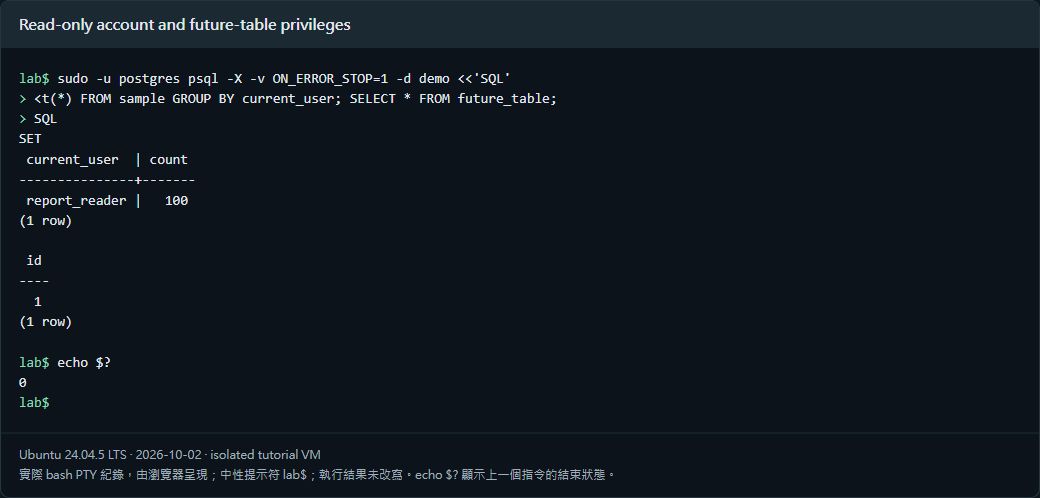
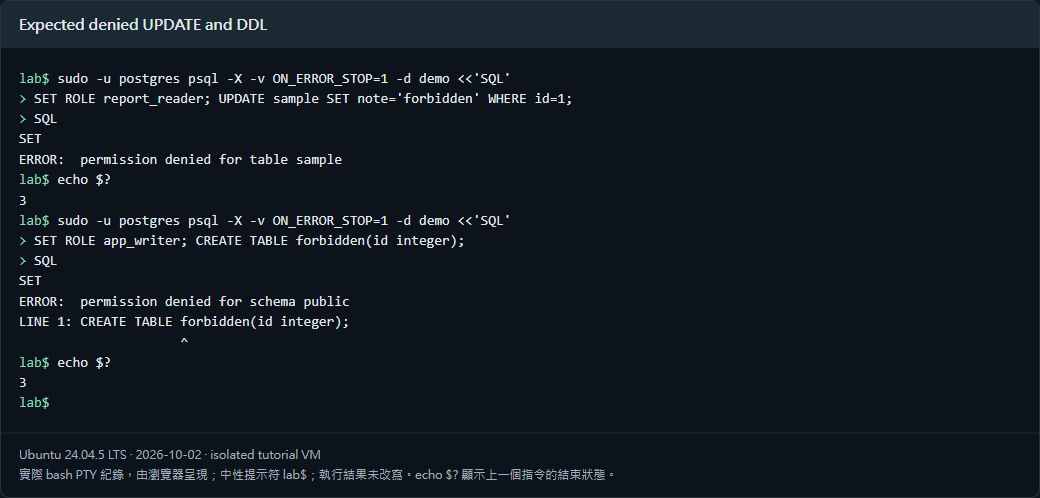
The first section should read 100 rows and the new table. The second should report permission denied for table sample. With ON_ERROR_STOP=1, an SQL error returns exit code 3; that rejection is expected here.
6. Verify application writes without DDL privileges
sudo -u postgres psql -X -v ON_ERROR_STOP=1 -d demo <<'SQL'
SET ROLE app_writer;
BEGIN;
INSERT INTO sample VALUES(101,'allowed');
UPDATE sample SET note='updated' WHERE id=101;
DELETE FROM sample WHERE id=101;
COMMIT;
SQL
sudo -u postgres psql -X -v ON_ERROR_STOP=1 -d demo <<'SQL'
SET ROLE app_writer;
CREATE TABLE forbidden(id integer);
SQL
Reads and writes should succeed; CREATE TABLE should fail on schema permissions. Applications handle data while the management workflow handles DDL. After reboot, the 100 rows and configured roles and privileges remained.
Verified results
| Verification | Result |
| Read-only SELECT allowed; UPDATE denied | Passed |
| Application INSERT/UPDATE/DELETE allowed | Passed |
| DDL denied to application and report roles | Passed |
| Default SELECT privilege applied to new table | Passed |
| Data and permissions persisted after reboot | Passed |
Scope: object and default privileges under SET ROLE, not separate users’ password login. Sequences, additional schemas, row-level security, and production migration identities require their own tests.
Official references
www.postgresql.org/docs/16/ddl-priv.html · www.postgresql.org/docs/16/sql-alterdefaultprivileges.html