Test environment and hardware
| Item | Tested configuration |
| Test date | 2026-10-02 |
| Operating system | Ubuntu 24.04.5 LTS, amd64 |
| Test hosts | 2 fresh isolated VM(s); resources below are per VM |
| CPU | 2 vCPU |
| Memory | 4 GiB |
| System disk | 32 GiB, HDD-backed, VirtIO, ext4 |
| Linux kernel | 6.8.0-139-generic |
| PostgreSQL | 16.15, native Ubuntu packages |
Combine encryption, server identity verification, and source restrictions for remote database access. Test incorrect certificates, passwords, plaintext, and unauthorized sources as well as successful connections.
On this page
This tutorial was tested on fresh, isolated Ubuntu 24.04 virtual machines with synthetic data. Packages came from signature-verified sources for Noble. No production database or website credentials were used. Check the sources and versions appropriate for your own environment.
The screenshots show actual bash PTY output from the test machines, rendered in a browser terminal view. The prompt is normalized to lab$; results were not rewritten. This English edition preserves the tested commands and original images. Some code comments, sample strings, and screenshot footers remain in Traditional Chinese. Copyable commands are provided separately.
First complete the native PostgreSQL installation. This series uses the demo database; where a sample table is required, follow the migration tutorial to create 100 synthetic rows. Work in an isolated learning environment.
1. Separate the three controls
| Control | Purpose |
| TLS + verify-full | Encrypt and verify the CA and server hostname |
| SCRAM | Authenticate the database role and password |
| pg_hba.conf | Select allowed source, database, role, and authentication method |
ssl=on makes TLS available; it does not force every connection on that port to use encryption. HBA rules must explicitly decide whether plaintext is accepted.
The documentation uses db.example.test, server 192.0.2.10, and client 192.0.2.11. They are examples, not public services. The test used isolated routes. Substitute reachable addresses and a hostname you manage.
2. Create a short-lived teaching CA and server certificate
Work in a private directory on the database host. Keep the CA private key on the management side and give clients only the public CA certificate. These certificates expire after two days; production requires a managed certificate lifecycle.
umask 077
mkdir -p ~/demo-tls && cd ~/demo-tls
openssl req -x509 -newkey rsa:2048 -nodes -days 2 \
  -keyout ca.key -out ca.crt -subj '/CN=Tutorial Test CA'
openssl req -new -newkey rsa:2048 -nodes \
  -keyout server.key -out server.csr -subj '/CN=db.example.test'
cat > server.ext <<'EOF'
subjectAltName=DNS:db.example.test
extendedKeyUsage=serverAuth
EOF
openssl x509 -req -in server.csr -CA ca.crt -CAkey ca.key -CAcreateserial \
  -out server.crt -days 2 -extfile server.ext
sudo install -o postgres -g postgres -m 0600 server.key /etc/postgresql/16/main/server.key
sudo install -o postgres -g postgres -m 0644 server.crt /etc/postgresql/16/main/server.crt
3. Configure PostgreSQL and narrow HBA rules
Back up existing configuration first. This is a complete example for an empty isolated host. On a shared server, review each rule and retain required administration and recovery paths. The listen_addresses address must exist on the server.
# /etc/postgresql/16/main/conf.d/demo-tls.conf
listen_addresses = '127.0.0.1,192.0.2.10'
ssl = on
ssl_cert_file = '/etc/postgresql/16/main/server.crt'
ssl_key_file = '/etc/postgresql/16/main/server.key'
password_encryption = 'scram-sha-256'
# /etc/postgresql/16/main/pg_hba.conf
local all postgres peer
local all all peer
hostssl demo app_user 192.0.2.11/32 scram-sha-256
hostnossl all all 0.0.0.0/0 reject
host all all 0.0.0.0/0 reject
host all all ::/0 rejectHBA uses the first matching rule from top to bottom. These rules allow only the named client to access demo/app_user over TLS, explicitly rejecting plaintext and other sources. A preceding permissive rule defeats later restrictions.
sudo -u postgres psql -X -d postgres
\password app_user
\q
sudo systemctl restart postgresql@16-main
sudo -u postgres psql -X -d postgres -c 'SHOW ssl;'
openssl x509 -in /etc/postgresql/16/main/server.crt -noout -ext subjectAltName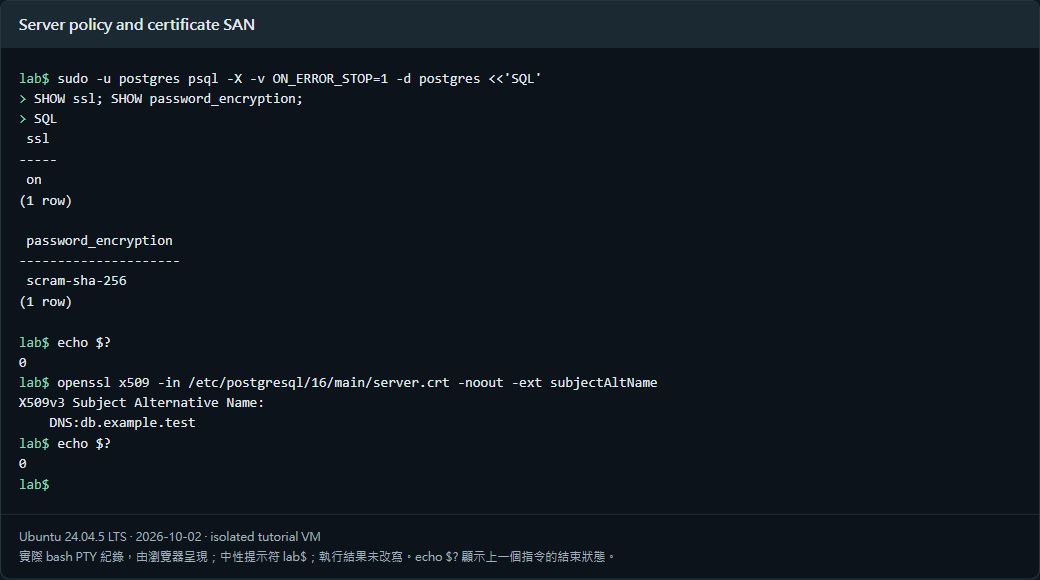
4. Connect from the separate client with verify-full
Place the public CA certificate on the client and resolve db.example.test to the database address. Preserve test hosts mappings through Cloud-Init or use managed DNS. Reboot persistence of this mapping was retested after identifying an overwrite.
psql -X -W \
  'host=db.example.test port=5432 user=app_user dbname=demo sslmode=verify-full sslrootcert=/path/to/ca.crt connect_timeout=5' \
  -c 'SELECT current_user, ssl, version, inet_client_addr() FROM pg_stat_ssl WHERE pid=pg_backend_pid();'
verify-full checks both the trusted certificate chain and hostname. sslmode=require does not replace those checks. -W requests an interactive password, keeping its value out of the command.
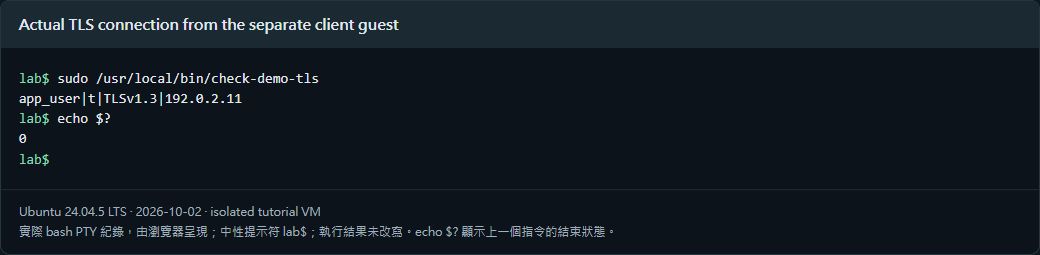
The screenshot’s check-demo-tls wrapper reads a private client-side password file with mode 0600 and uses the same libpq connection parameters. It prints only the role, TLS state, and documentation addresses, not passwords.
5. Test rejected connections too
| Test | Observed result |
| Correct CA, hostname, password, and source | Connected with TLS |
| sslmode=disable | Plaintext rejected by HBA |
| Wrong hostname | Certificate name check failed |
| Untrusted CA | Certificate verification failed |
| Wrong password | SCRAM authentication failed |
| Other source address | Rejected by HBA |
Both database and client VMs were rebooted. Name resolution, verify-full, TLS state, and source address still passed. HBA restricts access at the database layer; the network boundary should also limit which sources can reach port 5432.
Verified results
| Verification | Result |
| verify-full between two separate VMs | Passed |
| Rejected plaintext, wrong hostname, CA, password, and source | Passed |
| TLS state and source confirmed by SQL | Passed |
| Both VMs healthy after reboot | Passed |
Scope: a short-lived teaching CA and two isolated VMs, with authentication and source restrictions. Production CA issuance, automated renewal, mutual TLS, and public Internet exposure of port 5432 were not tested.
Official references
www.postgresql.org/docs/16/ssl-tcp.html · www.postgresql.org/docs/16/auth-pg-hba-conf.html · www.postgresql.org/docs/16/libpq-ssl.html