Test environment and hardware
| Item | Tested configuration |
| Test date | 2026-10-02 |
| Operating system | Ubuntu 24.04.5 LTS, amd64 |
| Test hosts | 1 fresh isolated VM(s); resources below are per VM |
| CPU | 2 vCPU |
| Memory | 4 GiB |
| System disk | 32 GiB, HDD-backed, VirtIO, ext4 |
| Linux kernel | 6.8.0-139-generic |
| PostgreSQL | 16.15, native Ubuntu packages |
Check the service, port, transport, and authentication in order. Reproduce three common failures, then verify a correct connection rather than masking errors with weaker authentication.
On this page
This tutorial was tested on fresh, isolated Ubuntu 24.04 virtual machines with synthetic data. Packages came from signature-verified sources for Noble. No production database or website credentials were used. Check the sources and versions appropriate for your own environment.
The screenshots show actual bash PTY output from the test machines, rendered in a browser terminal view. The prompt is normalized to lab$; results were not rewritten. This English edition preserves the tested commands and original images. Some code comments, sample strings, and screenshot footers remain in Traditional Chinese. Copyable commands are provided separately.
First complete the native PostgreSQL installation. This series uses the demo database; where a sample table is required, follow the migration tutorial to create 100 synthetic rows. Work in an isolated learning environment.
1. Identify the failing layer
| Symptom | Check first |
| no response / connection refused | Service, host, port, listener, network |
| Peer authentication failed | Socket transport, OS identity, local HBA |
| password authentication failed | Role, password, database, first matching HBA |
| certificate verify failed | CA, expiry, trust chain, hostname |
The tests used a fresh isolated VM without stopping production databases. An unbound port 6543 reproduced a wrong-port failure, an incorrect password tested SCRAM, and a mismatched local identity tested peer. Certificate rejection is covered in the TLS guide.
2. Test the actual database after checking service state
systemctl is-active postgresql@16-main
pg_lsclusters
pg_isready -h 127.0.0.1 -p 5432
sudo -u postgres psql -X -d postgres -c 'SELECT version();'
Ubuntu’s postgresql.service is an umbrella unit. Check postgresql@16-main and pg_isready for the actual cluster. An active service or accepting-connections response still does not prove the application’s password and table privileges work.
3. Understand Peer authentication failed
psql -X -U app_user -d demo -c 'SELECT 1;'Without -h, this command uses a Unix socket. If the local HBA rule uses peer, PostgreSQL compares operating-system identity. A user other than app_user may be rejected. Do not change local all all to trust as a general repair.
# 管理操作:以 postgres 作業系統身分執行
sudo -u postgres psql -X -d demo
# 應用登入:明確走 TCP,互動輸入密碼
psql -X -h 127.0.0.1 -p 5432 -U app_user -d demo -W
4. Distinguish a wrong port from a wrong password
pg_isready -h 127.0.0.1 -p 6543
echo $?
pg_isready -h 127.0.0.1 -p 5432
psql -X -h 127.0.0.1 -p 5432 -U app_user -d demo -W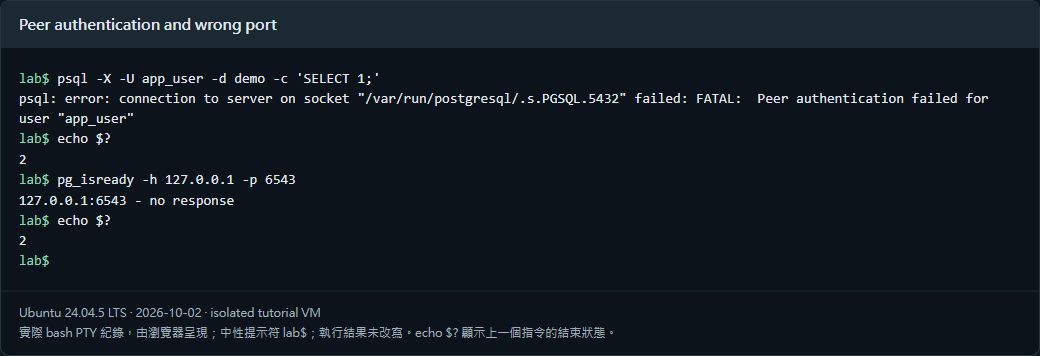
The unbound port 6543 returned no response and exit code 2; port 5432 accepted connections. Incorrect-password TCP login was rejected, while the correct private test password could query 100 rows. Passwords were excluded from captures, command arguments, and exported records.
5. Inspect settings and HBA before changing access
sudo -u postgres psql -X -d postgres <<'SQL'
SHOW config_file;
SHOW hba_file;
SHOW listen_addresses;
SHOW port;
SELECT line_number, type, database, user_name, auth_method, error
FROM pg_hba_file_rules ORDER BY line_number;
SQL
The query can reveal internal roles and paths; inspect it privately. Back up before editing. After HBA changes, run SELECT pg_reload_conf(), inspect parsing, and test a new connection. Listener or port changes usually need a restart and planned service impact.
6. Verify recovery through the real application path
Actual TCP password login and SQL queries were tested privately. The screenshot separately uses SET ROLE to display safe sample data; that picture alone is not evidence of password login.
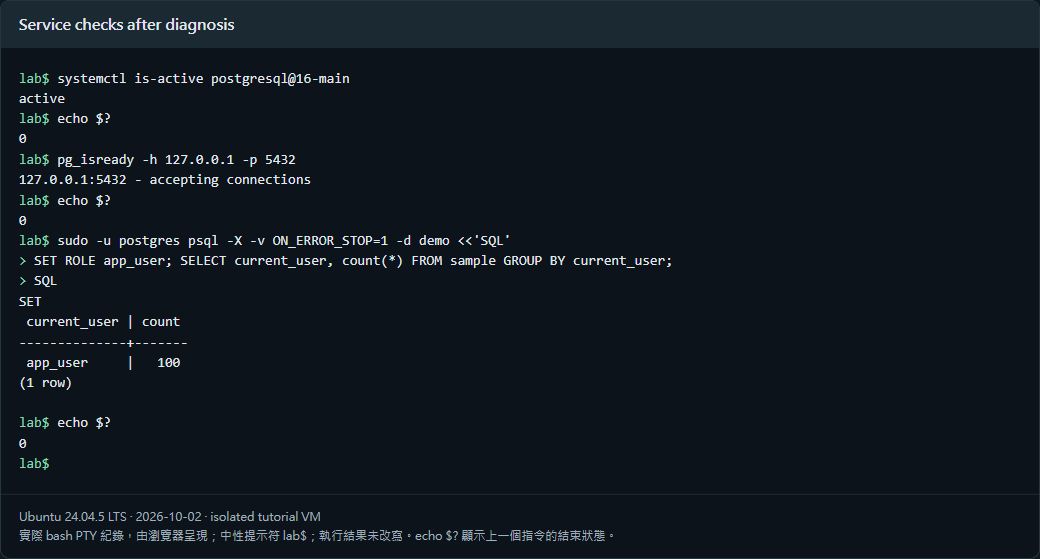
Final checks should include the correct host and port, actual role, required SQL operations, and a new connection. Existing pooled sessions may not reflect changed authentication. Reboot checks confirmed the service and sample data remained healthy.
Verified results
| Verification | Result |
| Peer failure reproduced | Passed |
| Wrong port returned no response | Passed |
| Incorrect TCP password rejected | Passed |
| Correct private TCP password permitted query | Passed |
| Service and data healthy after reboot | Passed |
Scope: peer mismatch, wrong password, and an unbound port. DNS failure, routed firewall restrictions, connection exhaustion, and production connection pools were not simulated. Raw HBA output remains private.
Official references
www.postgresql.org/docs/16/auth-peer.html · www.postgresql.org/docs/16/app-pg-isready.html · www.postgresql.org/docs/16/auth-pg-hba-conf.html